
Learn how to use AI Search in Cognism to find contacts and companies faster using natural language queries and automatically applied filters.
AI Search is a feature that lets you find contacts and companies using natural language. It is available in Cognism’s Sales Intelligence Platform web app.
You type your query in the search bar, and the system identifies relevant keywords and available filters to run a tailored search.
How to use AI Search in Cognism
Before you start
- You need access to Cognism’s Sales Intelligence Platform web app.
1) Open AI Search
- Open the Cognism web app.
- Locate the search bar
- If you have not started a search or applying filters, it appears in the centre of the screen.
Once you apply filters, it moves to the top of the page.
2) Enter your search
Type your query in the search bar.
3) Run the search
- Click the send icon, or press Enter.
4) Review results
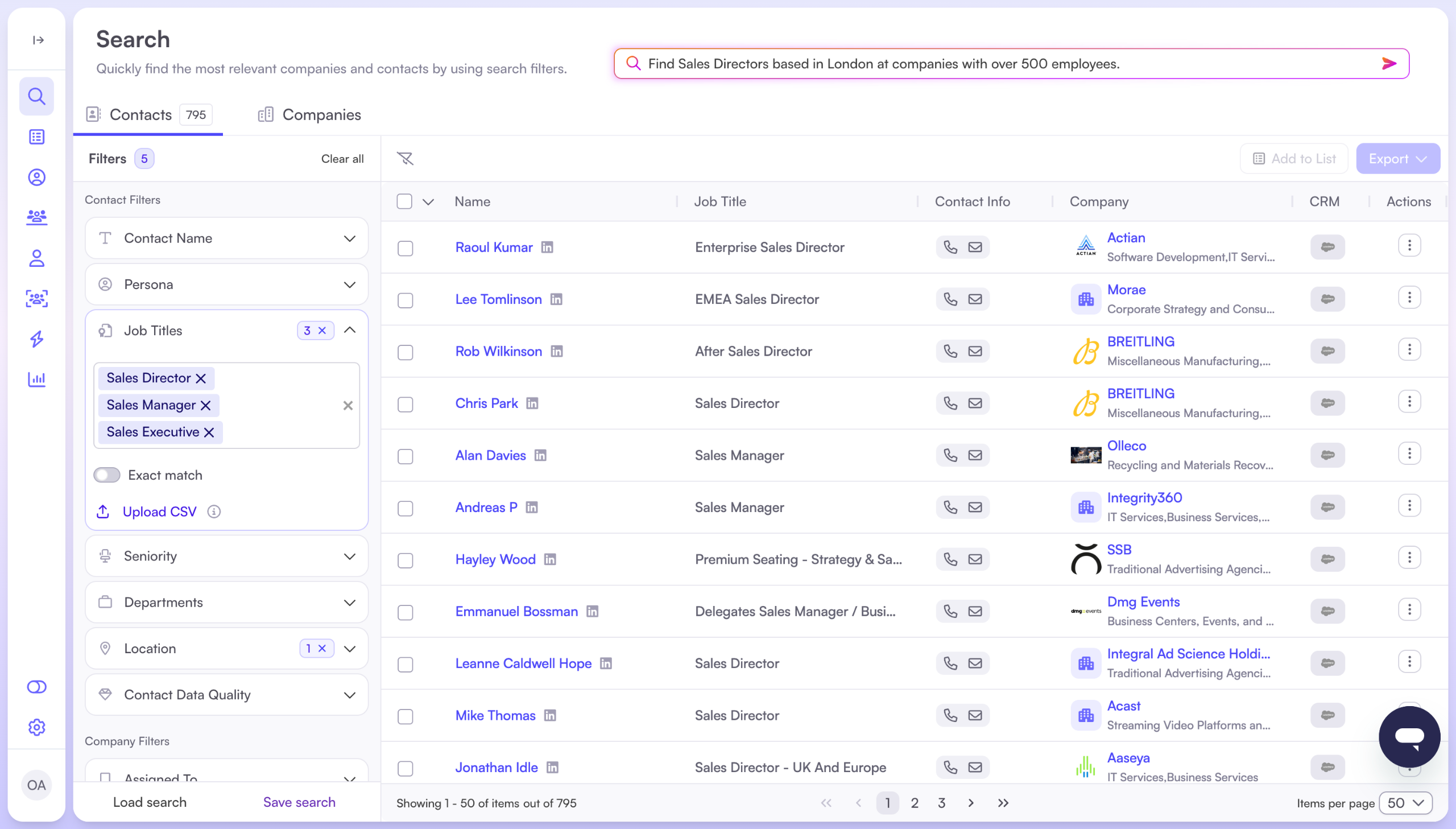
- Results are displayed based on your query.
- AI Search automatically applies relevant filters to match your query.
- You can view these filters in the left-hand panel.
You can update the filters at any time by adding, removing, or adjusting them.
5) View and reuse recent searches (optional)
- When you click on the search bar, you’ll see your recent searches.
- Click any previous search to run it again, or clear your search history if needed.
Tips for better results
- Use clear language. Include key details such as job title, location, seniority, company size, industry, technology, or funding.
- Use available filters in your query. AI Search can apply filters that are available in the platform.
Note
AI Search cannot answer general questions that rely on filters or categories that are not available in the platform.
- Avoid CRM-related questions. AI Search does not currently support questions about CRM data.
Example prompts
Quick examples
- “Find Sales Directors based in London at companies with over 500 employees.”
- “Show Project Managers in the technology sector in Austin at growing tech start-ups.”
- “Search for HR Managers in Berlin at companies using Salesforce.”
- “Display contacts in the Sales department in Tokyo at companies with annual revenue over $50 million.”
- “Find companies based in New York using Salesforce that recently received Series B funding.”
- A person’s name or surname.
Multilingual examples (English, French, German)
English
“I want computer software companies that have their HQ in the UK, with contacts based in the UK with CTO job titles.”
French
“Je veux des sociétés de logiciels informatiques dont le siège social est situé au Royaume-Uni et dont les contacts sont basés au Royaume-Uni avec des titres de poste de CTO.”
German
“Ich möchte Computersoftwareunternehmen mit Hauptsitz im Vereinigten Königreich und Kontakten mit Sitz im Vereinigten Königreich und CTO-Berufsbezeichnungen.”
Expected results
After you submit your query, the platform returns a list of matching companies and/or contacts, using available filters where possible. You can refine results using filters as normal.